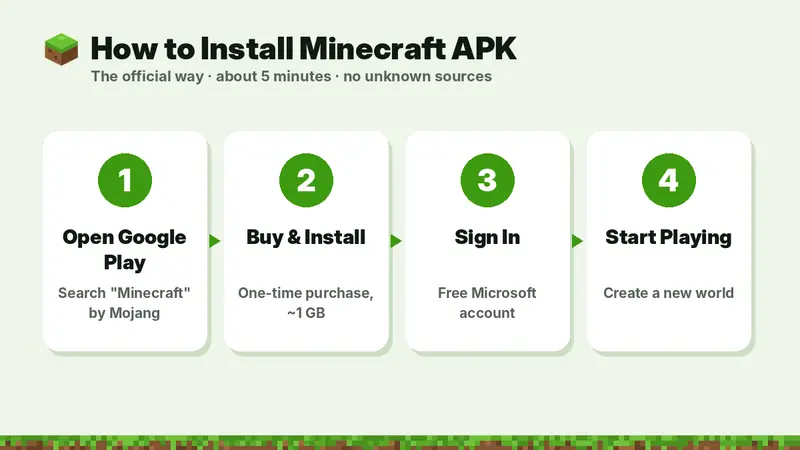
To download Minecraft APK safely: open Google Play, search Minecraft (developer Mojang), buy it once ($6.99 in the US), tap Install, then open the game and sign in with a free Microsoft account. It takes about 5 minutes and needs Android 8.0+ and roughly 1 GB of space. You do not need to allow "unknown sources" when you install from Google Play.
Table of Contents
- Before You Start
- Method 1: Download Minecraft APK from Google Play (Recommended)
- Method 2: Chromebook
- Method 3: Amazon Fire Tablets
- Installing an APK File Manually (Advanced)
- How to Update Minecraft APK
- Moving Minecraft to a New Phone
- Minecraft Kaise Download Karen? (Hindi)
- Fixing Common Installation Errors
This step-by-step guide shows how to download, install and update Minecraft on Android phones, tablets and Chromebooks, how to move it to a new phone without paying again, and how to fix the most common installation errors. It also includes a short Hindi section for players searching "Minecraft kaise download karen".
Before You Start
- Android version: 8.0 or newer (Settings → About phone → Android version).
- Free storage: at least 3 GB, so the ~1 GB download, unpacking and future updates fit.
- Payment method: card, carrier billing, Google Play balance or gift card for the one-time purchase.
- Wi-Fi: recommended because of the download size.
Method 1: Download Minecraft APK from Google Play (Recommended)
- Open the Google Play Store app or tap the official download button on this page.
- Search for Minecraft. The correct app is called "Minecraft: Dream it, Build it!" and the developer is Mojang.
- Tap the price button and confirm your payment. This is a one-time purchase.
- Wait for the download and installation to finish (about 1 GB).
- Tap Open. On first launch Minecraft may download extra resources.
- Sign in with a Microsoft account (free) to unlock multiplayer, Realms, Marketplace and achievements, or choose to play offline.
- Tap Play → Create New → Create New World, choose Survival or Creative and start building.
Method 2: Chromebook
On supported Chromebooks, Minecraft installs from the Google Play Store exactly like on a phone. Open the Play Store from the app launcher, search Minecraft, buy and install. Keyboard and mouse work out of the box.
Method 3: Amazon Fire Tablets
Fire tablets use the Amazon Appstore instead of Google Play. Open the Appstore on the tablet, search for Minecraft by Mojang and install it from there. Purchases on Amazon and Google Play are separate.
Installing an APK File Manually (Advanced)
Google Play delivers Minecraft as an app bundle split into several APK parts made for your exact device. A single "minecraft.apk" file offered online has been re-packaged by someone else, so we do not recommend it. If you still need to install an APK you trust (for example, your own backup), the general steps are:
- Go to Settings → Apps → Special app access → Install unknown apps.
- Allow only the app you will open the file with (for example, Files).
- Tap the APK file and choose Install.
- Turn the permission off again after installing.
Never install a Minecraft APK that is signed differently from Mojang's version. Android will show "App not installed" if you try to update it over the official app, and modified builds cannot sign in or update. Check our safety checklist first.
How to Update Minecraft APK
- Open Google Play and tap your profile icon.
- Go to Manage apps & device → Updates available.
- Tap Update next to Minecraft, or open the Minecraft page and tap Update.
- To never miss an update, open the Minecraft page, tap the three-dot menu and turn on Enable auto update.
Current version: 26.52, updated September 25, 2026. See all 2026 versions.
Moving Minecraft to a New Phone
- On the old phone, open Minecraft and export your worlds (Edit world → Export World) or upload them to a Realm.
- On the new phone, sign in to Google Play with the same Google account. Minecraft shows as purchased — tap Install, no payment needed.
- Sign in to Minecraft with the same Microsoft account to restore Marketplace items, skins and Minecoins.
- Import your exported
.mcworldfiles.
Minecraft Kaise Download Karen? (Hindi)
Step 1: Apne phone mein Google Play Store kholiye aur "Minecraft" search kariye. Developer ka naam Mojang hona chahiye.
Step 2: Price button par tap karke ek baar payment kariye (game ek hi baar kharidna hota hai, updates free milte hain).
Step 3: Install par tap kariye aur download (lagbhag 1 GB) poora hone dijiye.
Step 4: Game kholiye, free Microsoft account se sign in kariye aur nayi world banakar khelna shuru kariye.
Free mein try karna hai to Play Store se Minecraft Trial download kariye. Anjaan websites se "free Minecraft APK" download na karein — usmein virus ho sakta hai.
Fixing Common Installation Errors
| Error | Cause | Fix |
|---|---|---|
| App not installed | Another copy with a different signature is installed | Export worlds, uninstall the other copy, install from Google Play |
| Not available for your device | Android below 8.0 or unsupported device | Check Android version; try the Trial or another device |
| Not enough storage | Less space than the download plus unpacking | Free at least 3 GB and retry |
| Download pending | Other downloads queued or Play Store cache | Pause other updates, clear Play Store cache, restart |
| Crashes on first launch | Incomplete download or low memory | Restart phone, update the game, lower graphics |
Frequently Asked Questions
How do I download Minecraft on Android?
Open Google Play, search Minecraft by Mojang, buy it once and tap Install.
Minecraft kaise download karen?
Google Play Store kholiye, "Minecraft" search kariye (developer Mojang), ek baar kharidiye aur Install par tap kariye.
How do I update Minecraft APK?
Open Google Play → Manage apps & device → Updates, then tap Update next to Minecraft. Turn on auto update to stay current.
Why does it say "App not installed"?
Another copy of Minecraft with a different signature is installed. Back up worlds, uninstall it and install from Google Play.